Being able to decrypt a system’s root partition through SSH is a common need for every one working with clound providers, as it is very hard to trust them with clear IO data. The common pattern is to enrich initramfs, the minimal Linux distribution loaded in RAM during the boot process providing the so-called early-userspace, with a minimal SSH server (classically dropbear). mkinitcpio-dropbear does exist in the Extra repository but it isn’t actively maintained anymore and, as we will see, the way it launches dropbear would influence negatively with our ability to interact with cryptsetup. As for other approaches, jyn’s tutorial relies on AUR packages, which is far from ideal since I do not like the idea of having yay and, thus, gcc on a production server where I want to limit the attack surface as much as possible.
Field reconnaissance
In archlinux, the tool used to build initramfs images is mkinitcpio. As for other initramfs initializer, the set-up of the early userspace if defined by hooks sequentially called based on /etc/mkinitcpio.conf HOOKS fields. We first need to check what we got
 cat /etc/mkinitcpio.conf | grep -E '^HOOKS'

HOOKS=(base udev autodetect microcode modconf kms keyboard keymap consolefont block encrypt filesystems fsck)
This is what you’ll tipicaly find after an archinstall based installation. If it unfortunately contains systemd, first of all, why would you inflict this to yourself ? Second of all, the current tutorial probably won’t work despite adjustments; did not check, did not want to as I see the growing presence of this subsystem in initramfs as an heresy. Keep it simple, just use busybox!
Here, we notice the encrypt hook responsible for the console prompt in console we are used to. As for any hooks installed from packages, its installation script lives in /usr/lib/initcpio/install
/usr/lib/initcpio/install/encrypt
#!/bin/bash

build() {
    local mod

    map add_module 'dm-crypt' 'dm-integrity' 'hid-generic?'
    if [[ -n "$CRYPTO_MODULES" ]]; then
        for mod in $CRYPTO_MODULES; do
            add_module "$mod"
        done
    else
        add_all_modules '/crypto/'
    fi

    add_binary 'cryptsetup'

    map add_udev_rule \
        '10-dm.rules' \
        '13-dm-disk.rules' \
        '95-dm-notify.rules'

    # cryptsetup calls pthread_create(), which dlopen()s libgcc_s.so.1
    add_binary '/usr/lib/libgcc_s.so.1'

    # cryptsetup loads the legacy provider which is required for whirlpool
    add_binary '/usr/lib/ossl-modules/legacy.so'

    add_runscript
}
This part is responsible for copying cryptsetup into initramfs together with all its dependencies to unlock the partition (a few libs, and udev rules). The actual run_hook (i.e. what will be launched by busybox in initramfs) is defined in /usr/lib/initcpio/hooks/encrypt. As for user-defined hooks, as we will see, they live in /etc/initcpio/ which follows the same sub-directory logic.
Network configuration in the early userspace
Before we can even think of an SSH server, initramfs should have a functional NIC; which is absent by default. A hook already exists for this and is provided by mkinitcpio-nfs-utils
pacman -S mkinitcpio-nfs-utils
It might sound inelegant to load an nfs support hook while all we need is a network support. Unfortunately, such package does not exist and, for what I experimented, NFS server won’t start if its options are not supplied. Add net to /etc/mkinitcpio.conf
HOOKS=(base udev autodetect microcode modconf kms keyboard keymap consolefont block net encrypt filesystems fsck)
netshould live BEFOREencrypt
Next, we need to provide an ip parameter to the kernel runed by initramfs. The location might change depending on your system configuration but for a distro using UEFI, look at the entries in /boot. For Arch Linux, the options are provided by files in /boot/loader/entries/. Add ip=:::::eth0:dhcp to the options line
/boot/loader/entries/2026-03-19-00-00_linux.conf
# Created by: archinstall
# Created on: 2026-03-09_13-51-14
title   Arch Linux (recovery)
linux   /vmlinuz-linux
initrd  /initramfs-linux.img
options cryptdevice=PARTUUID=d95be135-c170-4bae-ade5-45ea9c8fb562:root root=/dev/mapper/root rw rootfstype=ext4 ip=:::::eth0:dhcp
You might wonder why we use here
eth0instead of the (un)predictable names (likeenp1s0) we are used to in the post systemD era. This is because, thanks God, in our case, systemD has not made its way to initramfs. This minimal linux distro is based on Busy box and still use the kernel standard naming. If your system posses only one NIC, you wont get any surprises from calling iteth0: even if the MAC address of the NIC changes, the default name will remain. However, in case of multiple NICs, have a look at this portion of the wiki
To build a new initramfs image that embarq our changes, simply
mkinitcpio -P
check that the [net] hook appears, restart and you should see the DHCP in action during the boot sequence.
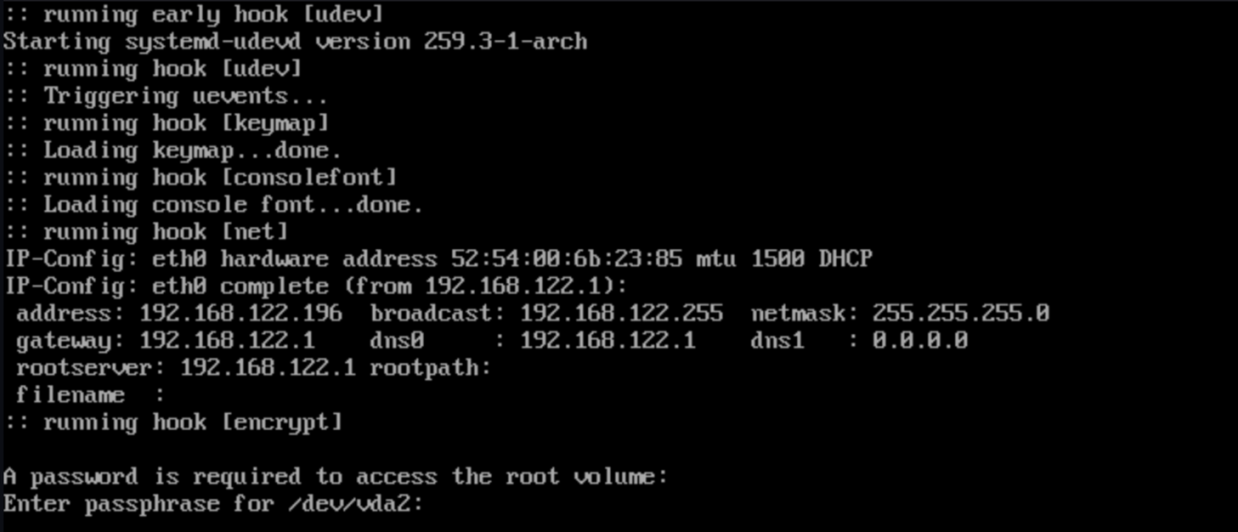
dropbear configuration
Next, we need dropbear
pacman -S dropbear
Hook definition
We could use mkinitcpio-dropbear but its implementation suffers for 3 major flaws.
- it lauchs dropbear with the
-E(Log to stderr rather than syslog) option: this will interact badly withcryptsetup - it copies by default system SSH host keys to use them in initramfs: we do not want system SSH Host keys to live in an unencrypted partition
- listened port is 22 and we can’t change it.
As instead, we can create our own hook to launch a dropbear server listening to 2222 and accepting ssh keys defined in /etc/dropbear/authorized_keys. The installation script would look like this:
/etc/initcpio/install/dropbear
#!/usr/bin/bash
generate_keys() {
  local keyfile keytype
  for keytype in rsa ecdsa ed25519; do
      keyfile="/etc/dropbear/dropbear_${keytype}_host_key"
      if [ ! -s "$keyfile" ]; then
          echo "Generating ${keytype} host key for dropbear ..."
          dropbearkey -t "${keytype}" -f "${keyfile}"
      fi
  done
}

build ()
{
  AUTHORIZED=/etc/dropbear/authorized_keys

  if [[ ! -f $AUTHORIZED || $(cat $AUTHORIZED) == "" ]]; then
    echo "Please list ssh keys authorized to access dropbear in ${AUTHORIZED}"
    exit 1
  fi

  umask 0022
  [ -d /etc/dropbear ] && mkdir -p /etc/dropbear

  generate_keys

  add_checked_modules "/drivers/net/"
  add_binary "rm"
  add_binary "killall"
  add_binary "dropbear"

  # user shell environement setting
  add_dir "/root/.ssh"
  cat /etc/dropbear/authorized_keys > "${BUILDROOT}"/root/.ssh/authorized_keys
  echo "root:x:0:0::/root:/bin/sh" > "${BUILDROOT}"/etc/passwd
  echo "/bin/sh"> "${BUILDROOT}"/etc/shells


  add_full_dir "/etc/dropbear"
  add_file "/lib/libnss_files.so.2"
  add_dir "/var/run"
  add_dir "/var/log"
  touch "${BUILDROOT}"/var/log/lastlog

  add_runscript
}

help ()
{
    cat<<HELPEOF
NO HELP FOR THE BRAVES
HELPEOF
}
Human version: create a minimal shell environment for user root (a home, a .ssh/authorized_keys, an entry in /etc/passwd so it exists), we record its shell as a valid shell (/etc/shells) and we copy dropbear’s accepted SSH keys as its own. Here we assume that no /etc/passwd nor /etc/shells existed in initramfs, which should be the case except in exotic configuration. As for starting dropbear, here is /etc/initcpio/hooks/dropbear:
#!/usr/bin/ash

run_hook ()
{
  [ -d /dev/pts ] || mkdir -p /dev/pts
  mount -t devpts devpts /dev/pts

  echo "Starting dropbear"
  /usr/bin/dropbear -s -j -k -p 2222
}

run_cleanuphook ()
{
    umount /dev/pts
    rm -R /dev/pts
    if [ -f /var/run/dropbear.pid ]; then
        kill `cat /var/run/dropbear.pid`
    fi
}
We just need to add this hook to /etc/mkinitcpio.conf right after net
HOOKS=(base udev autodetect microcode modconf kms keyboard keymap consolefont block net dropbear encrypt filesystems fsck)
provide authorized ssh keys in /etc/dropbear/authorized_keys like you’ve done in .ssh probably hundred of times and build a new image
mkinitcpio -P
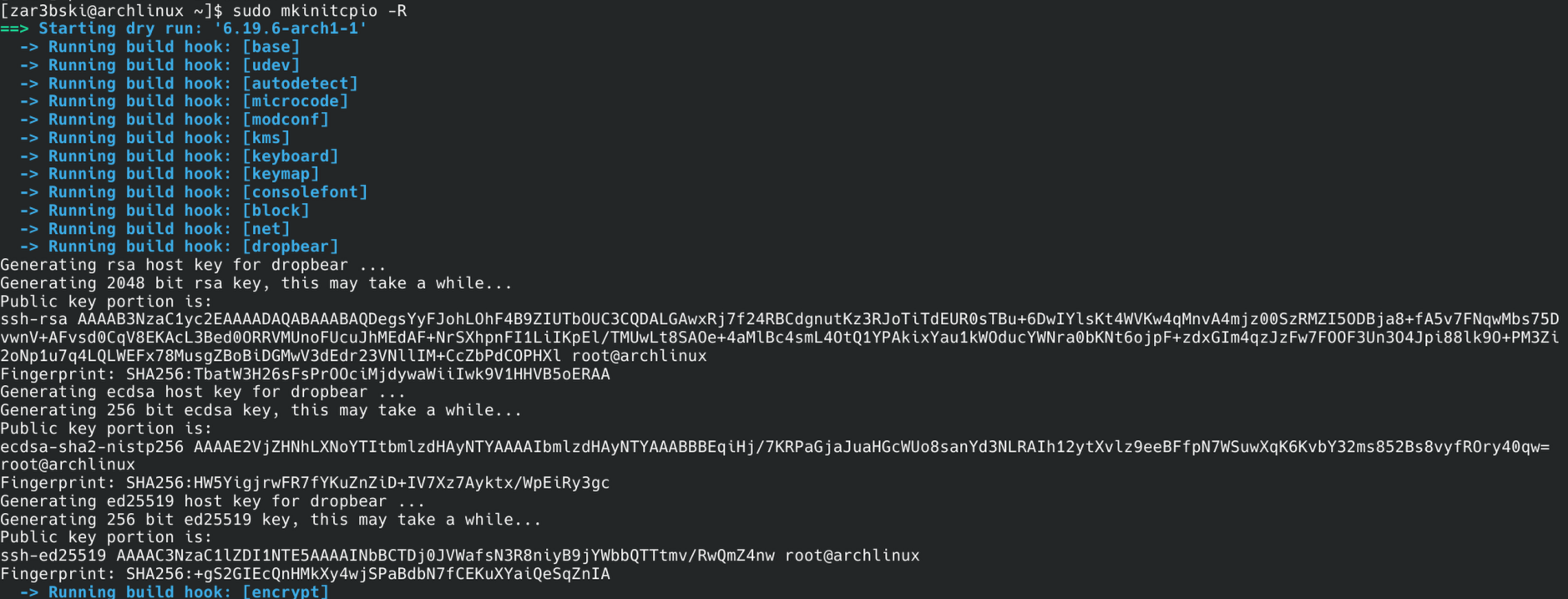
You should see that new SSH keys are generated. After restart, you should be able to ssh root@<host> -p 2222, provided that your public keys were added to /etc/dropbear/authorized_keys
About the tty piping dilemma
So far so good. Here comes the tricky part. In our ssh shell session, we can see the cryptsetup process waiting for the luks password
ps | grep crypt
...
201 root     11752 S    cryptsetup open --type luks /dev/vda2 root
...
Even if we decrypt the partition ourselves from our shell session, this process in sleep mode (S) would still block the boot sequence as it is waiting for a user input. Here are the options:
- alter the
encrypthook: we could provide a time limit or another breaking mechanism. However, altering what is provided by a system package is usually a recipe for a disaster, for changes could be overridden and we do not know the complete logic and intension behind this pretty complex hook. SaycryptsetupCLI implementation change in the future, we would be left with no way of unlocking the root partition from SSH but also for the console - kill the process after our decryption: does not work
- use it as it is, with its blocking logic, and provide the password to this waiting process from our shell. The chosen approach
The natural reflex would be to pipe directly the password to its STDIN:
echo "my_password\n" > /proc/201/fd/0
However, this does not have the expected effect

Our string is piped to /dev/console alright (i.e. what /proc/201/fd/0 points to) but this is not what cryptsetup is listening to. Reading the code of interactive_pass in the repository made the reason for it pretty clear:
/* Read and write to /dev/tty if available */
infd = open("/dev/tty", O_RDWR);
if (infd == -1) {
	infd = STDIN_FILENO;
	outfd = STDERR_FILENO;
} else {
	outfd = infd;
	close_fd = true;
}
Cryptsetup reads the password from the terminal device (/dev/tty i.e. the physical terminal interface) and rolls back to its stdin IFF it is not available. A few options are available to move an existing process to another terminal: conspy (deprecated AUR package) and a number of tioctl based tools such as injcode or reptyr. Since I was unlucky with reptyr
reptyr 201
[-] Process 1 (init) shares 201's process group. Unable to attach.
(This most commonly means that 201 has sub-processes).
Unable to attach to pid 201: Invalid argument
probably because the process is bound to tty and not to a pts, and since we do not need an interactive console for our current need, we can simplify the approach to send a unique string using this inject_to_tty.c
#include <stdio.h>
#include <fcntl.h>
#include <sys/ioctl.h>
#include <unistd.h>
#include <string.h>

int main(int argc, char *argv[]) {
    if (argc < 2) return 1;
    if (strlen(argv[1]) > 32) return 1;
    int fd = open("/dev/tty0", O_RDWR);
    if (fd == -1) {
      return 1;
    }
    for (char *s = argv[1]; *s; s++)
        ioctl(fd, TIOCSTI, s);
    char nl = '\n';
    ioctl(fd, TIOCSTI, &nl);
    close(fd);
    return 0;
}
Compile it from a machine where you have gcc (‘member, the whole point was not to have gcc on the production server) and send it to the server. In order not to transform this tool into an escalation privilege tool, I would recommend i) that root owns it and ii) that only root could read write or run it. Let put it in /usr/bin
mv inject_to_tty /usr/bin
chown root:root /usr/bin/inject_to_tty
chmod 700 /usr/bin/inject_to_tty
About TIOCSTI flag in the linux kernel, there is a decades long security debate about its very presence and most if not all BSD distributions have disabled it. The Linux stance on the subject was not to disable it but, rather, since 6.2, to restrict its access to user with the
CAP_SYS_ADMIN(akaroot). This might change in the future but, for the time being, as long as this flag exists in Arch kernel, our solution remains available. If it feels like a hack, it is because it kinda is, but a hack that onlyrootis able to execute.
Back to the hook
Now that we know how we will pipe the luks pass into cryptsetup, we will need to slightly modify our hook. First of all, in the install, we must include inject_to_tty and include a script to be runed by dropbear at session start-up.
#!/bin/sh

echo "Please provide the password to unlock the system partition:"
read -s PASSWORD

/usr/bin/inject_to_tty $PASSWORD
Instead of writing a script in /etc/dropbear, why don’t we make the install hook write the file instead
/etc/initcpio/install/dropbear
#!/usr/bin/bash
generate_keys() {
  local keyfile keytype
  for keytype in rsa ecdsa ed25519; do
      keyfile="/etc/dropbear/dropbear_${keytype}_host_key"
      if [ ! -s "$keyfile" ]; then
          echo "Generating ${keytype} host key for dropbear ..."
          dropbearkey -t "${keytype}" -f "${keyfile}"
      fi
  done
}

build ()
{
  AUTHORIZED=/etc/dropbear/authorized_keys

  if [[ ! -f $AUTHORIZED || $(cat $AUTHORIZED) == "" ]]; then
    echo "Please list ssh keys authorized to access dropbear in ${AUTHORIZED}"
    exit 1
  fi

  umask 0022

  generate_keys

  add_checked_modules "/drivers/net/"
  add_binary "rm"
  add_binary "killall"
  add_binary "dropbear"
  add_binary "inject_to_tty"

  add_dir "/root/.ssh"
  cat /etc/dropbear/authorized_keys > "${BUILDROOT}"/root/.ssh/authorized_keys
  echo "root:x:0:0::/root:/bin/sh" > "${BUILDROOT}"/etc/passwd
  echo "/bin/sh"> "${BUILDROOT}"/etc/shells

  cat >"${BUILDROOT}"/usr/bin/decrypt_system.sh <<EOL
#!/bin/sh
echo "Please provide the password to unlock the system partition:"
read -s PASSWORD
/usr/bin/inject_to_tty \$PASSWORD
EOL
  chmod +x "${BUILDROOT}"/usr/bin/decrypt_system.sh

  add_full_dir "/etc/dropbear"
  add_file "/lib/libnss_files.so.2"
  add_dir "/var/run"
  add_dir "/var/log"
  touch "${BUILDROOT}"/var/log/lastlog

  add_runscript
}

help ()
{
    cat<<HELPEOF
TODO
HELPEOF
}
/etc/initcpio/hooks/dropbear
#!/usr/bin/ash

run_hook ()
{
  [ -d /dev/pts ] || mkdir -p /dev/pts
  mount -t devpts devpts /dev/pts

  echo "Starting dropbear"
  /usr/bin/dropbear -s -j -k -p 2222 -c /usr/bin/decrypt_system.sh  &
}

run_cleanuphook ()
{
    umount /dev/pts
    rm -R /dev/pts
    if [ -f /var/run/dropbear.pid ]; then
        kill `cat /var/run/dropbear.pid`
    fi
}
Last but not least, once more
mkinitcpio -P
What about the case where cryptsetup rolls back to STDIN
Since we could be in an headless context where the machine does not have a physical console, we also need to handle the case where cryptsetup rolls back to reading its STDIN. The general logic would be the following:
#!/bin/sh

echo "Please provide the password to unlock the system partition:"
read -s PASSWORD

CRYPT_PID=$(ps | grep "[c]ryptsetup" | cut -d' ' -f3)

# first try tty, roll back to STDIN if it fails
/usr/bin/inject_to_tty $PASSWORD || echo "${PASSWORD}\n" > /proc/$CRYPT_PID/fd/0
However, I would excercice extreme caution with this solution, for any exception or exit 1 of inject_to_tty would trigger the echo and, thus, write the password on the physical console (if any). These risks could be properly handled by a more robust control flow in the C code (e.g. not assuming /dev/tty0 but make sure that no TTY are available on the system) and, say, an explicit switch on custom exit code in the bash script but this is beyond the scope of the current tutorial.
First visit

You should now be able to log into dropbear as root (notice that SSH host keys are different from those of the system) and decrypt your partition.